CSS Specificity Algorithm

whenever you define CSS style decoration, you have noticed that sometime for a single element we have assigned multiple decoration styles and we thought which style will that element gets when the website render in the browser ?
e.g.
<style> p{ color: red }  </style>

<p style="color: pink" > this is the paragraph content </p>
output : p element text will print in pink color.
But the question is How p element text get pink decoration when we have 2 style applied to a single tag. and how browser decided which style decoration to applied on that element ?
The answer is simple “CSS specificity algorithm” take a crucial role here.
I know you are bit confused and have so, many question going in your mind like isn’t in css it follows the cascading approach ?
why we need specificity algo when we have cascading algorithm in CSS ?
The specificity algorithm is the sub-step of Cascading algorithm. it is a part of cascading algorithm. which help a browser to decide which decorator gets prioritized and which one have low priority.
Now lets, understand what is specificity algorithm and how it’s works.
What is Cascading Algorithm :
this algorithm is use to resolve the conflicting style issue eg. for a single element we have applied multiple CSS rules than which one will win and get applied. this decide with the help of cascading algorithm.
this algorithm has 4 sub-stages : -
- Position and order of appearance : for same
selectors(tag or class or id etc.) the most recent or relevant style get applied.
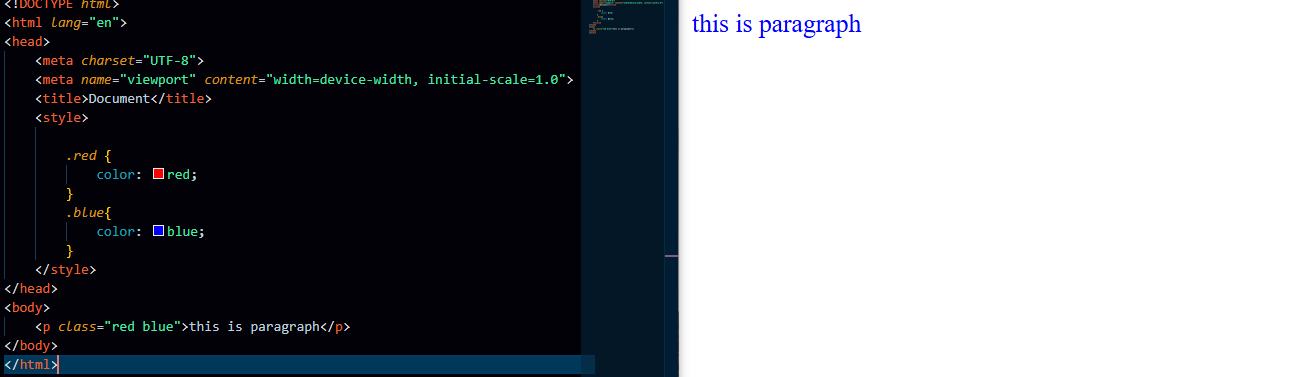
because red and blue both are “class selector” and have same weightage ( priority) that’s why the most recent style get applied to p element. which is .blue style.
Specificity : it’s an algorithm that determine which selector has strongest priority. strongest selector style get applied. eg. when different type of selector target to single element then specificity help us to resolve this conflict.
the order of selector priority -
inline > ID > Class > Element > Universal
example of selectors -
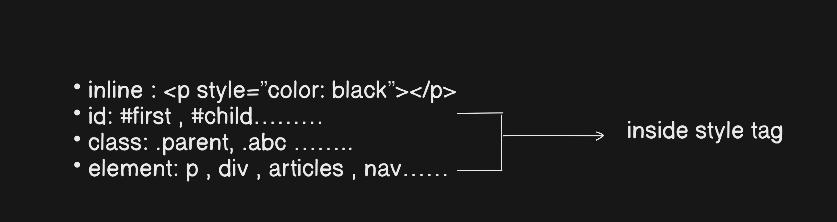
Origin : The browser default css properties applied when there is no css file.
!important: has the highest priority even higher then inline. it is not a selector it’s a attribute which we assign to any css rule. eg -
color: blue !important ;
That’s it for today guys see you soon, in my next Blog.
Good Bye :)